Blackmagic Design / Switch
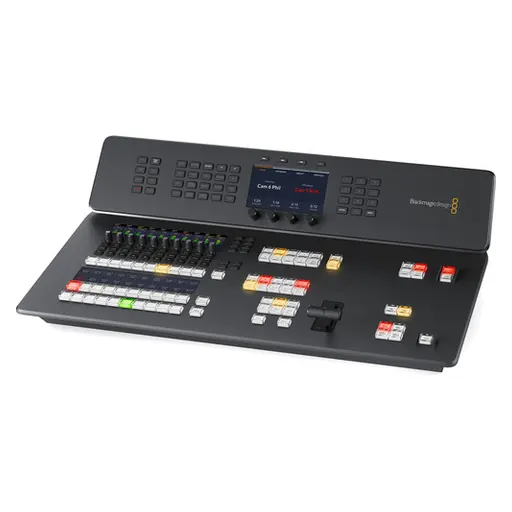
Blackmagic Design ATEM Television Studio HD8 ISO (2TB SSD)
SKU KY-B836DD84295F · Unit: piece
Key Features 8-Input 3G-SDI 1080p60 Live Switcher Redesigned Buttons and Layout Record Each Input to Separate Files Supports Remote Internet Cameras Streaming Support, USB & M.2 Recording Blackmagic C
Review quotation list →Ask sales to confirm stock, configuration and compatibility.
Product description
Add an all-in-one live streaming switcher to your television studio, remote production, or live venue with the ATEM Television Studio HD8 ISO from Blackmagic Design. This compact, redesigned live TV switcher is a great fit to any streaming production, providing eight 3G-SDI inputs that support up to 1080p60 video, built-in live streaming, USB webcam support, audio mixing, chroma keyers, DVE, transitions, media players, internal recording, and talkback support. This ISO model also allows you to record each input to separate files, and it allows you to control and integrate control of remote Internet cameras. The switcher is compatible with the Blackmagic Cloud, so your program recordings can be available immediately from anywhere around the globe. The switcher features an all-new button layout, and it's made from polycarbonate material, so it's much lighter than its predecessor. It provides numerous enhancements to the layout with professional buttons, LCD label displays, and an easy-to-navigate button layout. It includes all the features you'd need for studio operation, including talkback compatibility, GPI and tally interfaces, and timecode as well as a MADI input that supports up to 32 channels and 64 output channels for use with external switchers; input audio can be mapped to any of the eight SDI outputs as well as analog audio input and output. The HD8 ISO features built-in live streaming, and it can connect to the Blackmagic Cloud to share your program for a smooth remote workflow. It also features redundant Ethernet and power to keep your production going if one connection is lost. Two USB-C connectors are available for use as either a webcam, when connected to a computer, or you can utilize an external disk for recording your program. Live Production You get an incredibly powerful 8-input switcher with both program and two aux outputs, so you have everything you need for mobile production. That means you can connect up to 8 cameras. Plus you get professional camera control, talkback, and audio mixing, all designed into a familiar broadcast panel. Postproduction The ISO model records all inputs into separate files, so you can edit using any NLE that supports multicam. That's possible because all files have perfect timecode sync. Plus with built-in network storage, you can edit while recording. Multiple users can even share media and collaborate. Distribution With a built-in hardware streaming engine, you can live stream your event to a global audience. Recording to H.264 files with AAC audio means you get the correct format to upload to YouTube. Plus, you share live broadcasts with your audience by using the aux outputs and large screens and projectors. Production Switcher Control You get an advanced broadcast-grade switcher, with built-in ATEM Advanced Chroma Keyers, Fairlight audio mixer, DVE, still store for graphics, and more. Most of the features can be operated from the front panel, or you can use the free ATEM Software Control on macOS or Windows to access even more features. Easy Setup and Usage Simply press any of the program row buttons on the front panel to cut between video sources. Or you can pre select a source on the preview row and then choose between cut or effect transitions by selecting the cut or auto buttons. You can select from exciting transitions such as dissolve, or more dramatic effects such as dip to color, DVE squeeze, and DVE push. You can even add a DVE for picture-in-picture effects with customized graphics. There are also media players, which let you store graphics with alpha channels for titles and graphics that you can load as live video inputs. Then you can live stream the results. Redesigned Front Panel The front panel includes buttons for selecting sources, triggering transitions, and setting up video effects. Plus the buttons are the same high-end type used on expensive broadcast switchers. You also get a built-in T-bar for manual transition control. The front panel even has an innovative audio mixer control area with live metering on a dedicated LCD. There are also buttons for recording and streaming control, plus live aux switching that lets you change aux outputs between all 8 cameras, program, preview, or the multiview. Connect 5G or 4G Phones for Mobile Data If you're doing live production on location, then the ATEM Television Studio HD supports mobile data by connecting an Apple or Android phone to the USB port. It's also a great backup for the main Ethernet connection. Phone tethering works with the latest high-speed 5G phones plus the more common 4G phones.The ATEM switcher will detect when a phone is connected and automatically switch its internet connection to use it if the Ethernet connection is lost. When connected, the phone will also power from the USB port, so it always remains charged and ready to go. By using phone tethering and mobile data, you get the perfect mobile production solution that can be transported anywhere. Edit Live Production with Separate ISO Recordings The ATEM Television Studio HD ISO model allows you to edit your live event as it can record all inputs to separate video files. You get 8 separate video input files with matching timecode and sync, plus the program video is also recorded into a separate master video file. This means you can edit using any NLE software that supports multi-cam editing.A DaVinci Resolve Project file is saved and linked to the input video files, so your live switching is converted into an edit timeline that you simply click to open. Now it's easy to re-edit your show with new color grades and even updated graphics. Plus all audio is recorded into separate WAV files, so you can professionally remix your audio. Connect to Remote Internet Cameras Another exciting feature on the ATEM Television Studio HD ISO model is that it can connect to remote cameras. The Blackmagic URSA Broadcast G2, Blackmagic Studio Camera 4K Pro G2, and Blackmagic Studio Camera 6K Pro cameras can live stream in H.264 direct to the switcher. If you're connected to the local network, then simply select the camera in the input menu.However, if the switcher is set to a fixed external IP address, then you can export an XML file with the camera settings to live stream from anywhere on the internet. Simply load the XML file into the camera. Plus you even get camera control and tally. Program audio is also sent back to the camera, which is great for live interviews. Broadcast Style Mix/Effects Switching ATEM Television Studio uses a professional program/preview style of operation, which is exactly the way large broadcasters use live production switchers. ATEM Television Studio can be switched to A/B style switching, which is easier when it's used by volunteers or community groups. However, if you want to operate the switcher like a broadcast professional, then the program/preview is perfect. This means a source won't be put on air until you press the cut or auto button. This two-step process means you see what you are selecting before putting it to air, so you get fewer mistakes. Add Exciting Video Effects One of the benefits of ATEM Television Studio is the range of professional built-in video effects. The cut button ensures an instant cut when switching between sources. The T-bar fader can be used to transition video effects, or you can do the transition automatically by pressing the auto button. Auto uses the transition duration set in the system control. You can also select the type of effect you want, including mix, which does a smooth transition between sources, or dip which transitions via a third video source, such as a color generator. There is a wide range of SMPTE wipes included, plus DVE effects that slide or squeeze the image off screen when transitioning between video sources. Creative Transitions ATEM Television Studio includes the same kind of transitions found on expensive broadcast switchers. This means the effects and transitions can be customized in many different ways, so they are surprisingly powerful. You'll never stop finding new ways of using them. That's because all transitions can be customized by adjusting parameters such as duration, border color, border width, position, and direction. You can even use the DVE with a wipe transition, where the DVE moves a graphic over the wipe edge. That's called a graphic wipe and it's often used in sports broadcasting. The preview transition button can be used to set up effects offline, which is great for eliminating mistakes. Built-In DVE ATEM Television Studio HD features an independent DVE that lets you reposition graphics and create picture-in-picture compositions. You get amazing quality and the DVE supports position, resize, and scale, all in real time. The DVE lets you create professional picture-in-picture effects with customizable 3D borders, shadows, and lighting. DVEs can also be used to create amazing DVE transitions with squeeze, swoosh, and push effects for adding excitement to your programming. You can even combine DVE transitions with custom graphics to create your own graphic wipe transitions. Pus, there is also a SuperSource multilayer processing engine with 4 extra DVEs. Supports Internal Media The built-in media pool stores broadcast-quality graphics and animations that can be played back using the built-in media players. Media players appear as independent sources, so you don't need to waste any of the SDI inputs for graphics. For highest quality, all media supports RGB colorspace with alpha channel, allowing transparency and layering. The media pool can hold 20 HD resolution stills. Motion graphics, clips for animations, and stingers can be up to 400 frames in 720HD and 200 frames in 1080HD. The ATEM Software Control allows you to upload and manage media. You can even prepare graphics in Adobe Photoshop and then download to the media pool using the free ATEM Photoshop plug-in. Includes 4 ATEM Advanced Chroma Keyers ATEM Television Studio is perfect for news and on-set presentation work because it features 4 ATEM Advanced Chroma Keyers for green screen keying effects. The chroma keyers are incredibly powerful and include features, such as a color picker to sample background colors for automatic generation of the key parameters. You get precise controls for edge and flare, and there is even a foreground color corrector, so you can match the foreground and background layers for seamless compositions. You can even use it for title overlays by creating graphics with a green or blue background. With 4 ATEM Advanced Chroma Keyers, ATEM Television Studio is perfect for creating fixed camera virtual sets. SuperSource Processing In addition to the DVE in the ATEM Television Studio, there is also a powerful SuperSource multilayer processor. SuperSource gives you 4 extra DVE layers plus a background layer, all layered together as an additional input source. Any video input can be used as sources for each DVE, then it's all layered together over a media pool, custom background, or live video. SuperSource is perfect for doing multiple picture-in-picture displays with people being interviewed, because you can set up the effect, so the viewer can see each person being interviewed, all within a stylish graphic. SuperSource is just like having a completely independent multilayer VFX switcher built in. 8 Standards Converted 3G-SDI Inputs The ATEM Television Studio HD features 8 independent 3G-SDI inputs, with each input featuring its own dedicated standards converter. That means it's possible to convert any 1080HD or 720HD input source to the video standard of the switcher, so you could have each switcher SDI input running a different television standard and all the inputs would just work.SDI input audio channels 1, 2, 3, and 4 can also be manually routed to various embedded audio channels in the program and aux outputs. Plus, you can even router out audio channels 1 and 2 from the SDI inputs to the MADI digital audio output, so you c