
Blackmagic Design / Cameras
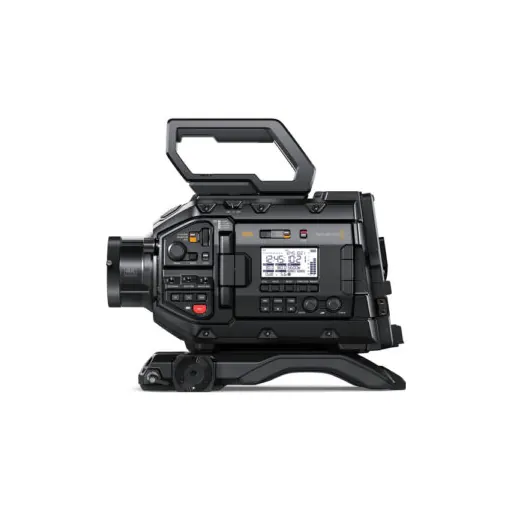
Blackmagic Design URSA Broadcast G2 Camera
SKU KY-5712F27A2328 · Unit: piece
Blackmagic Design Highlights 6K Super35 CMOS Sensor, Dual Native ISO 2/3" B4 Lens Mount & Active EF Mount 6K Blackmagic RAW Recording Records to ProRes, H.265/264 12G-SDI Input & Output, Genlock/Timec
Review quotation list →Ask sales to confirm stock, configuration and compatibility.
Product description
Features Update your broadcast studio or internet broadcast camera with a versatile 3-in-1 powerhouse using the Blackmagic Design URSA G2 Broadcast Camera. This updated G2 model features generation 5 color science and not only supports up to UHD 4K as its predecessor for production and studio work but can now be used as a 6K Super 35mm digital film camera that records in Blackmagic RAW format. The lens mount is compatible with 2/3" B4 lenses, but it also includes an active EF mount adapter, allowing you to access a long line of professional cinema lenses, as well as having the ability to change out the lens for an optional PL or F mount. Its large Super35-size sensor acts as a 2/3" sensor when using a B4 mount, but it becomes a 6K sensor with 6144 x 3456 resolution when recording to RAW and a 5.3K cinema size sensor with windowing when shooting in UHD 4K with cinema lenses. It allows you to apply 3D LUTs for cinema-like looks. The G2 also features numerous broadcast and field production features such as built-in optical ND filters, focus servo support, fine iris control, a 4" capacitive touchscreen LCD with live tally, PGM output, a small status display, a timecode generator, push-button controls, and assignable shortcut keys. The B4 lenses automatically send electronic data from B4 lenses, so you can sync slate and lens data to the camera. The updated G2 now allows you to record in common media formats, including ProRes 422 and 422 HQ, 10-bit H.265, H.264, and Blackmagic RAW. Recording is done with two internal CFast 2.0 card slots and two SD UHS-II card slots, and it also features a powered USB 3.1 Gen 2 Type-C output for external recording with the optional URSA Mini Recorder or 2.5mm drive, as well as for the Blackmagic Design Focus and Zoom Demand. The camera's industry-standard video interfaces include a 12G-SDI input and one 12G-SDI output for studio control, as well as an SDI monitor output. It retains the dual XLR audio inputs for line/mic audio with 48V phantom power, a 3.5mm analog headphone jack that is compatible with iPhone-style headsets for talkback, a reference input for sync/black burst/timecode, a 12-pin Hirose for broadcast lens controllers, and a 2.5mm LANC port for start/stop control. An additional USB Type-C is included for firmware updates. You can also perform camera control from your iOS or Android smartphone or tablet using the Blackmagic Camera Control app via Bluetooth+ or via tRigger on iOS. The camera body is constructed with durable and lightweight magnesium, so it will hold steady in any environment. To power the camera, you can use the included 12 VDC power adapter or the preinstalled V-mount plate to utilize professional, high-capacity V-mount batteries. Also included with the camera are the URSA Mini shoulder pad, the URSA Mini top handle, a viewfinder mounting plate, and all the installation hardware and lens caps. A downloadable copy of DaVinci Resolve Studio is included, along with access to future camera software updates. Three Cameras in One Broadcast Production Camera The perfect solution for broadcasters, URSA Broadcast G2 includes ENG camera controls positioned around the camera, so you can locate them by feel. It also features a low-light sensor, so you get amazing images using natural light. That's the perfect combination for broadcast news and programming. Live Studio Camera URSA Broadcast includes an advanced YRGB color corrector built-in and full remote camera control. You can use B4 ENG or large studio box lenses, or even change the lens mount and use any lens. Plus, the optional Blackmagic focus and zoom demands let you control the lens from the tripod handles. Digital Cinema Camera URSA Broadcast G2 includes an advanced 6K digital film sensor, and you can change the lens mount. Use a PL mount for digital film lenses or EF for photo lenses. Plus, the high dynamic range, great low-light performance, and Blackmagic RAW means you get a true "Hollywood" quality digital film camera. Key Features Digital Film Quality for Broadcast The large 6K sensor, combined with Blackmagic generation 5 color science, gives you the same imaging technology used in digital film cameras. This means broadcasters can now use digital cinema quality in broadcasts. The 6K sensor features a resolution of 6144 x 3456, so it's flexible enough for broadcast and digital film work. When using B4 lenses, you get a 4K window of the sensor for Ultra HD broadcast use. Then, if you change to a PL or EF lens mount, you can use the full 6K resolution of the sensor for digital film. With 13 stops of dynamic range, you get darker blacks and brighter whites, so it's perfect for color correction. Using digital film in broadcast is a revolution in image quality. Low-Light Performance The new URSA Broadcast features incredible low-light performance, so you can shoot using ambient light or even under moonlight. In advanced cameras, ISO is a measurement of the image sensor's sensitivity to light. The Blackmagic URSA Broadcast G2 features gain from -12dB (100 ISO) up to +36dB (25,600 ISO), so it's optimized to reduce grain and noise in images while maintaining the full dynamic range of the sensor. The primary native ISO is 400, which is ideal for use under studio lighting. Then the secondary high base ISO of 3200 is perfect when shooting in dimly lit environments. The gain can be set via a camera switch, the LCD menu, or remotely using the SDI remote camera control protocol. Compatible with B4 Broadcast Lenses The URSA Broadcast G2 features a B4 broadcast lens mount that includes optics specifically designed to match the camera's sensor. The B4 lens mount lets you use modern UHD lenses or lower-cost HD lenses. Older HD lenses often feature resolutions well beyond HD, so you get great quality at a low cost. B4 lenses are fantastic because they are par-focal, so the image stays in focus as you zoom in and out, so you don't need to constantly chase focus as you shoot. That lets you work much faster. You also get full electronic lens control to adjust focus, iris, and zoom using the camera's controls or remotely. Plus, if you want to use alternative lenses, you can change the mount to PL, EF, and more. Built-In Optical ND Filters URSA Broadcast G2 features high-quality neutral density (ND) filters that let you quickly reduce the amount of light entering the camera. The 1/4, 1/16th and 1/64th stop filters have been specifically designed to match the image sensor and color science of URSA Broadcast G2, providing you with additional latitude and better colorimetry. This lets you use different combinations of aperture and shutter angles in a wider range of situations. The IR filters have been designed to evenly filter both optical and IR wavelengths, eliminating IR contamination Plus, the filter status on the LCD can be displayed as a fraction, number, or stop reduction. Common Media and File Formats URSA Broadcast is designed to work with standard file formats used by all broadcast systems and editing software. You can record in ProRes 422 HQ and ProRes 422 into QuickTime files. The new Blackmagic URSA Broadcast G2 model can even record into H.265 for incredibly small files at 60:1 to 285:1 compression ratios, in 10-bit broadcast quality. Plus. you can record to Blackmagic RAW files, a revolutionary new format designed to capture and preserve the quality of the sensor data from the camera. That means you get the perfect range of file formats designed for all types of workflows. Dual Media Slots for Nonstop Recording With dual CFast 2.0 recorders and dual SD/UHS-II card recorders, you can choose the media that's best for you. Both types of media are standard, inexpensive, and readily available at computer and camera stores. Plus, with dual media slots, URSA Broadcast gives you nonstop recording. When a card is full, recording automatically continues onto the next card, so you can swap a full card while recording continues. You get enough speed to record high-quality ProRes and H.265 video file formats, even when working in Ultra HD at high frame rates. That means URSA Broadcast G2 is easy to integrate into your existing broadcast systems. You can even record 12-bit Blackmagic RAW cinema files. USB Type-C for Recording Direct to External Media Disks The Blackmagic URSA Broadcast G2 features a high-speed USB Type-C expansion port on the rear of the camera that allows you to record to external disks or connect to a wide range of accessories. If you plug in a large and low-cost external USB flash disk, you can record ProRes, H.265, or even high-quality 12-bit Blackmagic RAW files for later editing and color correction. That means you can just move the disk to a computer to work, and you don't need to waste time with file copying. Plus, the USB port will power the disk that's plugged in. You can even plug in optional focus and zoom demands to allow full lens control. Strong and Lightweight Magnesium Design URSA Broadcast G2 features a super-strong, lightweight magnesium alloy body that's perfectly balanced and designed to be comfortable to use all day. It features familiar, externally mounted switches and controls that give you direct access to the most important camera settings. The controls are laid out logically, making them easy to locate by feel, so you can adjust settings without having to look at the buttons. You also get a foldout touchscreen for monitoring, viewing camera status, and changing settings using on-screen menus. URSA Broadcast G2 also includes standard 12G-SDI connections, XLR audio inputs, USB Type-C, and an industry-standard 4-pin XLR broadcast 12 VDC connection. Built-In LCD with Touch Controls With a built-in LCD that folds out, you can both monitor and control the camera. While URSA Broadcast G2 features lots of physical buttons and knobs, using the LCD, you also get on-screen status and touchscreen controls. The built-in touchscreen also includes a heads-up display with the most important shooting information, as well as menus for all camera settings, LUTs, and custom presets. Behind the LCD, there are extra buttons, as well as knobs for audio levels. There are even programmable function buttons that can have functions assigned to them, such as zebra, false color, focus peaking, LUTs, and more. Plus, you can change the function assigned to each button in the on-screen menus. External Status Display The status display is a high-visibility LCD screen designed to be easily seen, even in bright light. The status display shows record, locked, and reference timecodes, along with the current shooting frame rate, shutter angle, aperture, white balance, gain, and iris. It also features a battery indicator, card recording status, and audio meters for monitoring levels. The screen's backlight can be turned on when you are shooting in dimly lit locations and off when you are shooting outdoors and in bright light to increase contrast, making it easy to read under any condition. Program Video Monitoring If you're doing live production, sometimes you need to monitor program video back from the switcher. Simply press the camera's PGM button and the viewfinder will switch from the camera display to the program return feed from the switcher. A built-in speaker also lets you monitor the switcher audio as well. Program return is a fantastic feature, as sometimes on large live shows, camera operators can be left waiting a long time for their camera to be used, so program return lets them watch the show while they wait. This means that even if the camera operator is a large distance away from the switcher, they can still keep up with what is happening and remain alert. Load Custom 3D LUTs to Recreate Film Looks Digital film cameras shoot logarithmic color space to preserve the dynamic range, which is great for later post-production. However, when these files are viewed on a monitor, they can look flat and washed out. 3D LUTs solve this problem as they allow you to apply a "look